

Tarot card size and print files for your deck
Everything a print-ready file needs, in millimeters and inches, with step-by-step setups for the programs people use. Files don't have to be perfect: send what you have and we prepare them, $50 per item, free from 48 decks of one design.
We cut cards in millimeters. Every size on this page also has its inch figure beside it.
The short version
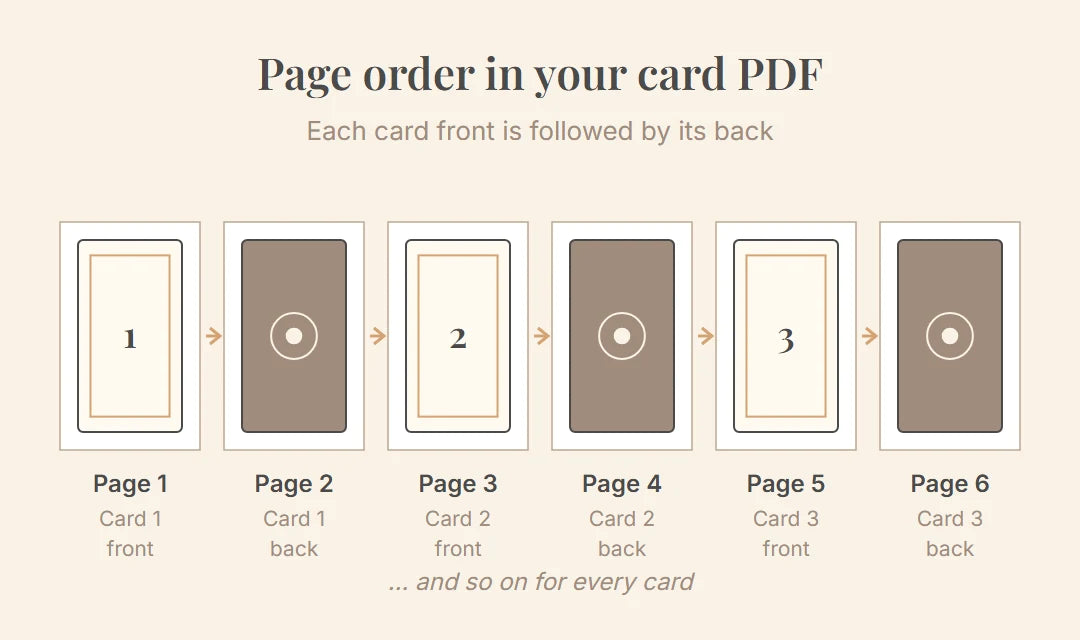
- One PDF per deck: card 1 front, card 1 back, card 2 front, card 2 back…
- Each page is the card plus 0.08 in (2 mm) on every side: 2.91 × 4.88 in (74 × 124 mm) for a standard tarot card
- Background runs to the edge of the page; text stays 0.24 in (6 mm) in from the page edge
- 300 dpi, CMYK, fonts outlined or embedded, no crop marks
- Made with 1/8 in bleed for another printer? Send it as it is. We trim it free.
Template kit (ZIP, 3.7 MB) Card template 2.91 × 4.88 in / 74 × 124 mm (PDF) 35 KB
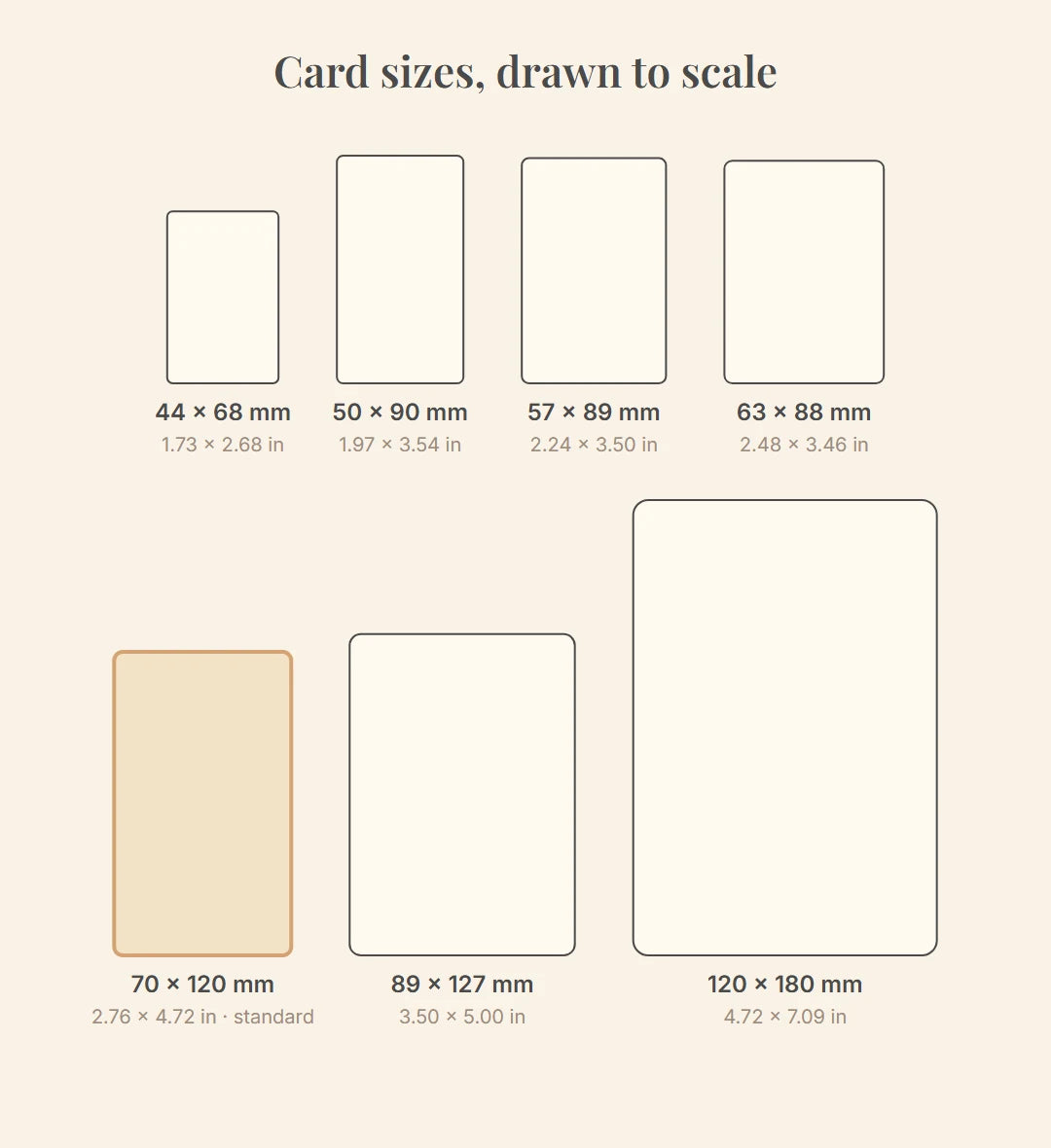
Cards: size, bleed and safe area
| Card size | In inches | File page with bleed | Page in inches | Page in pixels at 300 dpi |
|---|---|---|---|---|
| 2.76 × 4.72 in (70 × 120 mm), standard tarot | 2.76 × 4.72 in | 2.91 × 4.88 in (74 × 124 mm) | 2.91 × 4.88 in | 874 × 1465 px |
| 2.48 × 3.46 in (63 × 88 mm), poker | 2.48 × 3.46 in | 2.64 × 3.62 in (67 × 92 mm) | 2.64 × 3.62 in | 791 × 1087 px |
| 2.24 × 3.50 in (57 × 89 mm), bridge | 2.24 × 3.50 in | 2.40 × 3.66 in (61 × 93 mm) | 2.40 × 3.66 in | 720 × 1098 px |
| 1.73 × 2.68 in (44 × 68 mm), mini | 1.73 × 2.68 in | 1.89 × 2.83 in (48 × 72 mm) | 1.89 × 2.83 in | 567 × 850 px |
| 1.97 × 3.54 in (50 × 90 mm), slim | 1.97 × 3.54 in | 2.13 × 3.70 in (54 × 94 mm) | 2.13 × 3.70 in | 638 × 1110 px |
| 3.50 × 5.00 in (89 × 127 mm), large | 3.50 × 5.00 in | 3.66 × 5.16 in (93 × 131 mm) | 3.66 × 5.16 in | 1098 × 1547 px |
| 4.72 × 7.09 in (120 × 180 mm), extra large | 4.72 × 7.09 in | 4.88 × 7.24 in (124 × 184 mm) | 4.88 × 7.24 in | 1465 × 2173 px |
Our cards are cut in millimeters; the inch figures are exact conversions, rounded. Poker size is close to the US 2.5 × 3.5 in, bridge to 2.25 × 3.5 in, but not identical, so set the page from this table. Another size? Choose Your own size in the calculator and type the width and height.
- Bleed: 0.08 in (2 mm) on every edge
- Run the background to the edge of the file page. This strip is cut away. Files with 1/8 in (0.13 in (3.2 mm)) bleed are fine too: we trim the extra at no charge.
- Safe area: 0.16 in (4 mm) inside the cut
- Keep text, numbers, faces and logos at least 0.16 in (4 mm) inside the trim line, which is 0.24 in (6 mm) from the edge of the file page. On a standard card the safe area is 2.44 × 4.41 in (62 × 112 mm).
- Frames and borders: 0.20 in (5 mm) inside the cut
- A frame around the card sits at least 0.20 in (5 mm) inside the trim line, 0.28 in (7 mm) from the edge of the file page. Then a small shift in cutting can't be seen.
- Corners are rounded
- Keep anything important out of the corners.

Card files
- One PDF, card by card
- Page 1 is the front of card 1, page 2 its back, page 3 the front of card 2, and so on. A deck of N cards is a PDF of 2N pages: 156 pages for 78 cards, 88 for 44. If all cards share one back, repeat it on every back page.
- One card per page
- No sheets of several cards, no crop marks.
- 300 dpi at full size
- Images at 300 dpi when placed at 100 %.
- CMYK
- All colors and placed images in CMYK, total ink no more than 300 %, overprint off, no embedded color profiles.
- Fonts
- Converted to outlines or fully embedded.
- Formats
- PDF preferred. AI, EPS and INDD accepted; PSD and TIFF flattened.
- Card count
- From 30 to 500 cards a deck. Title or information cards count as cards.
RGB files, lower resolution, scans, JPG or PNG images and Word text are welcome too, as material for file preparation. If what you send isn't print-ready, we tell you with the proof and you decide.
Step by step in your program
The figures below are for the standard 2.76 × 4.72 in (70 × 120 mm) tarot card. For another size, take the page size from the table above.
Canva
- On the home page choose Custom size, set the unit to in and enter 2.91 × 4.88 in.
- Fill the whole page with your background, right to the edges.
- Keep text and faces at least 0.24 in from every edge.
- Make the card front on page 1 and its back on page 2, then front and back for every card, in order.
- Share › Download › File type PDF Print. Leave 'Crop marks and bleed' off (it is off by default): your page already includes the bleed.
- On Canva Pro you can pick the CMYK color profile in the same menu. On the free plan the file is RGB; that's fine, we check the colors at the proof.
Procreate
- In the Gallery tap +, then the new canvas button, and in Custom Canvas enter 874 × 1465 px at 300 DPI.
- Under Color Profile choose CMYK (for example Generic CMYK Profile). You can't switch a canvas from RGB to CMYK later, so pick it now; RGB still works as material for file preparation.
- Paint the background to every edge. Keep text and faces at least 71 px in from each edge, frames at least 83 px.
- Make one canvas per card side.
- Export each side with Actions › Share › PNG and name the files in order: 01-front, 01-back, 02-front, 02-back…
- Combine them into one PDF: on a Mac select the files in Finder in that order, Control-click, Quick Actions › Create PDF. Or send the images and add file preparation of the cards: we put them in order for you.
Photoshop
- New document: width 874 px, height 1465 px, resolution 300 pixels/inch, color mode CMYK.
- View › New Guide Layout, tick Margin and enter 71 px on all four sides: that marks the text safe area.
- Run the background to the edge of the canvas. The trim line is 24 px in from each edge, so nothing important goes in that strip.
- Save one file per card side, numbered in order.
- File › Automate › PDF Presentation: add the files in order (front, back, front, back…), choose Multi-Page Document and save one PDF. Or send the files and we combine them.
Illustrator and InDesign
- New document 2.76 × 4.72 in (70 × 120 mm) with 0.08 in (2 mm) bleed on every side. One artboard or page per card side, 2N in total.
- Extend the background to the bleed line. Keep text 0.16 in (4 mm) inside the trim line, frames 0.20 in (5 mm).
- Convert text to outlines or embed the fonts.
- Export Adobe PDF (Print) with a PDF/X preset such as PDF/X-4. Under Marks and Bleeds tick 'Use Document Bleed Settings' and leave all printer's marks off.
Affinity or any other program
- Set the page to the card size + 0.16 in (4 mm): 2.91 × 4.88 in (74 × 124 mm) for the standard card. Or set the card size with 0.08 in (2 mm) bleed in the document setup and include the bleed when you export.
- Fill the background to the edge. Put guides at 0.08 in (2 mm) (trim), 0.24 in (6 mm) (text) and 0.28 in (7 mm) (frames) from each page edge.
- Export a PDF at 100 % with the guides hidden and no crop marks.
- Open the PDF and check the page size (2.91 × 4.88 in or 74 × 124 mm), the page count (2 per card), the edges and the order.
Booklet
- Size
- 2.76 × 4.72 in (70 × 120 mm) for the standard card, on a 2.91 × 4.88 in (74 × 124 mm) page with 0.08 in (2 mm) bleed. For other card sizes the booklet is sized to fit the box; we confirm it after you order.
- Pages
- 48 pages including the covers is the standard. A longer booklet is possible, up to 100 pages, printed on thinner paper so it still closes with staples; the calculator prices it. A stapled booklet's page count is a multiple of 4: 8, 12, 16 … 100.
- Margins
- Text at least 0.24 in (6 mm) from the trim line.
- Paper and color
- White paper, stapled. Color or black-and-white, same price.
- File
- One PDF of single pages in reading order: page 1 the front cover, the last page the back cover. No spreads, no crop marks. CMYK, 300 dpi, fonts embedded or outlined.
- Only have text in Word or Google Docs?
- Send it. Laying out the booklet is part of file preparation.
- Booklet template, 48 pagesPDF 194 KB
- Booklet example: cover, inside page, backPDF 606 KB
Box
The tuck box is standard and included in the price. The lid-and-base box is a two-piece box of printed, laminated card (not rigid board), available as an option. Both are printed in full color on the outside.
- Use the template at 100 %
- Open it at actual size. Don't redraw or rescale it, and don't scale the lid to make the base.
- Bleed
- Run the background 0.08 in (2 mm) past every cut line.
- Safe area
- Keep titles, text and logos at least 0.16 in (4 mm) inside each panel and away from the folds.
- Export
- Hide or delete the template's cut-and-fold layer before you export, so the file shows your artwork only.
- Which template
- Our templates fit 78 cards of 2.76 × 4.72 in (70 × 120 mm) with a 48-page booklet. For any other deck, your box template comes after you order, sized to your cards and booklet.
- Working in Canva or Procreate?
- A box template is hard to use there. Send the front, back and spine artwork as separate images and we place them on the template as file preparation.

Each box template has its sheet size and main panel size printed on it, in mm and inches.


Example files
Open one before you start. Each is a finished, print-ready file you can copy.
- One card, front and back 2-page PDF, 2.91 × 4.88 in (74 × 124 mm), with the trim and safe lines shown on a separate preview page.PDF 561 KBPreview with trim and safe lines (PDF) 573 KB
- A 3-card deck 6-page PDF in the right order: front, back, front, back, front, back.PDF 1.5 MB
- Booklet Cover, an inside page and the back cover, single pages.PDF 606 KB
Sending files and proof
- You don't need files to pay. After payment your order email has a personal upload link that doesn't expire.
- Upload large files there, paste a Google Drive, Dropbox or WeTransfer link, or reply to the email with attachments.
- We send you a PDF proof. Nothing is printed until you approve it in writing.
- Printing takes 3–4 weeks from your approval, then delivery.
Or we prepare your files
We print decks ourselves, so we know what a file needs before it reaches the press. Send what you have and we turn it into files that print right.
Cards (all cards of one design fitted to size with bleed, colors set, text inside the safe area, pages in order): $50. Booklet laid out from your text: $50. Box made on the template: $50. All three are free from 48 decks of one design printed with us.
Printing with someone else? We prepare files to your printer's template too.
Templates
- Card template 2.91 × 4.88 in / 74 × 124 mmPDF 35 KBSVG 2 KB
- Booklet template, 48 pagesPDF 194 KB
- Booklet example: cover, inside page, backPDF 606 KB
- Tuck box templatePDF 33 KBSVG 14 KB
- Lid templatePDF 29 KBSVG 8 KB
- Base templatePDF 29 KBSVG 8 KB
- Print guidePDF 321 KB

Checklist before you send
- Page size is the card size + 0.16 in (4 mm)
- Background reaches every edge
- Text 0.16 in (4 mm) inside the trim line, frames 0.20 in (5 mm)
- Pages alternate: front, back, front, back
- 2 pages per card, in the right order
- 300 dpi, CMYK, fonts embedded or outlined
- Booklet: single pages, a multiple of 4, text 0.24 in (6 mm) from the trim
- Box: on our template at 100 %, cut lines hidden